by Admin | Dec 27, 2022 | Backup and Recovery, Blog
Backup and Recovery

In this part we want to know, what is Backup and Recovery? Backup refers to storing information in external memory to protect information from accidents and loss. Recovery refers to returning data from a saved copy to the original location or to an alternate location where information has been lost or damaged.
To store information, we use a separate system or media such as virtual hard drives, data storage servers or cloud storage space to protect them against the possibility of data damage.
Why do we need backups?
Why do we need backups? By making a backup copy, we make a copy of the information in a peripheral memory so that we can recover it in case of damage to the primary data. Primary data failures usually occur for the following reasons:

- Hardware defect
- Defect in the software
- Corruption of information
- Human error – accidental deletion of data
- Attack of viruses or malware
by having a backup copy of the data, we can restore it from the initial point in time.
Having a copy of information in an external space is very vital and necessary to prevent information loss. This additional copy can be, for example, an external hard drive or a USB memory or a disk storage system or Cloud storage:
- The source device (a workstation),
- Your local backup device (External HDD),
- Off-site location (Cloud backup solution).

Backup solutions:
- File-only backup,
- Server backup,
- Desktop backup
Backup methods:
There are two general methods for backup:
1. Field or traditional method:
Data is serially backed up using a backup server or software. The backend server retrieves the data and indexes, compresses, and encrypts the data for optimization and easy search before sending it.
2. Array-based method:
This backup method is based on array. The way this method works is based on Snapshots, which provides an alternative for data protection.

The advantages of this method include:
-
- High performance on personal memories
- Low pressure on memory
- Higher service level to provide more backup copies
- Productivity and high efficiency of stored data
- Easier and faster use of data alignment
If you are interested in seeing some learning you can click here.

by Admin | Dec 22, 2022 | Blog, Network Security
What types of network security do we have?
 We divide the Types of Network Security into two parts:
- Software programs
- Hardware parts
The best choice is to use both (software and hardware) together. Software programs such as Anti-worms, Anti-viruses, Firewalls, etc. Hardware components also include firewalls. It can control and scan the input and output ports. Microsoft has provided this feature for its users in Windows, but this software alone does not provide sufficient computer security.
Some examples of strong anti-malware programs are Antivirus, Symantec, Kaspersky, Nod32, Bitdefender, Norton, Panda, Mac
For hardware parts, you can mention Cisco ASA or Astaro Firewall. The best and safest solution for large organizations is to use two hardware devices at the same time, so that if one of them has a problem, the second device can continue working.
One of the most important actions in network security is to prepare a backup copy of information and files on a backup server. In terms of security, if there is an attack and a failure occurs in the files or the system, we must be able to read the backup immediately after cleaning the system.
Security in wireless networks:
in the topic of types of Network Security, since wireless networks are expanding every day and cable networks are becoming obsolete, it is especially important to know the weak points of these networks and find solutions to increase their security.
Here are some security methods that use in wireless networks:
- WEP: Wired Equivalent Privacy: In this method, which is suitable for small networks, it blocks users who do not have permission in the network.
- SSID: Service Set Identifier: These identifiers are placed in several Access Points and each user must configure the corresponding SSID identifier.
- MAC: Media Access Control: In this method, only the computers whose MAC address has already been saved and are part of the list are allowed to access. This method is exceedingly difficult for large networks because all addresses must be stored.
The weakness of wireless networks:
One of the biggest disadvantages of these networks is the borderless coverage of the network structure, which means that vandals can receive its signals near this network and in case of breaking the not so strong security barriers of these networks, they can pretend to be a member of these networks. bring and have the possibility of obtaining vital information and destruction.
Ways to increase the security of systems
- Check that the operating system and installed programs are up to date
- Checking settings and detecting vulnerabilities
- Installing anti-virus programs
- Encoding data and files
- Control user access to files, for example, edit and delete only specific users, and all users have read-only access.
What are benefit of using Firewall:
- We can manage and control policies and services separately
- Selection of input and output services to the network
- Security control and user access management
- Protecting and preventing those who intend to infiltrate the internal network
we can divide Firewalls into several categories:
- Circuit-level firewalls: this group disconnects the network connection with the computer behind them and takes the initial response instead of that computer, and if they are satisfied with the security of the connection, then they allow the data to go to the computer. flow This type has good speed because they do not check any data inside the packets
- Proxy server firewalls: In this type, information packets are checked in the application layer, and it provides high security by preventing the direct connection of the program with the servers, but this level of checking can lead to the slowness of these firewalls.
- No stateful packet filters: These filters allow packets to pass or block them in network layer protocols such as IP or in transport layer protocols such as TCP and UDP headers in the path of a network with a set of rules.
- Stateful Packet filters: These filters are much smarter and block all incoming traffic. They create connection records at the transport layer and are the basis of firewall implementation in modern networks. They store source and destination TCP and UDP port numbers, TCP sequence numbers and TCP flags, and can detect application layer protocols such as FTP and HTTP.
- Personal firewalls: Personal firewalls are installed on personal computers and are designed to deal with network attacks. The suggestion of installing on personal computers is extremely high
You can find other learning for Network Security by clicking here.
by Admin | Dec 18, 2022 | Blog
What is Cloud Service?
in this post we want to know what is Cloud Service? Cloud services are one of the popular services in the web and technology world. In this section, we want to examine cloud services (Like Azure, Google, Amazon).
What are cloud services?
Cloud services are a set of services that are provided based on cloud architecture and on the Internet. Cloud services can be provided in different forms.
 IaaS: The name of these services stands for Infrastructure as a Service and includes bandwidth, processing, or similar services. For example, we can mention Amazon’s web services.
 PaaS: The name of this service stands for Platform as a Service and in this space, users can develop software. In this service, we can use hardware resources for software development. For example, we can mention Force.com service. Of course, other companies also provide other forms of these services.
 SaaS: The name of this service stands for Software as a Service and this form is the most important service provided by the cloud service on the Internet. For example, when you log into your Gmail account and Google Drive, you will see a collection of software based on these services. We can also mention the Basecamp and Netflix services that are based on this.
DaaS: The name of this service stands for Desktop as a Service and this service is such that you can have a completely software environment like your personal computer in the web environment, with the difference that an unlimited amount of processing resources, memory and it gives us the graphics and we can have more processing resources and memory based on the payment fee.
Today, cloud computing is a principal element in the world of software. Now Adobe, Autodesk, Microsoft, Apple, Amazon, and other non-software companies such as HP provide cloud services. From what we see, in the not-so-distant future, all software activities will be performed on cloud service platforms.

If you are interested in seeing some learning you can click here.
by Admin | Dec 12, 2022 | Blog, Virtualization
What is virtualization and what is the use of virtualization?
It is a modern technology in the network and the use of this technology leads to cost and time reduction and increases efficiency and optimization. In this article, we examine the importance of Virtualization.
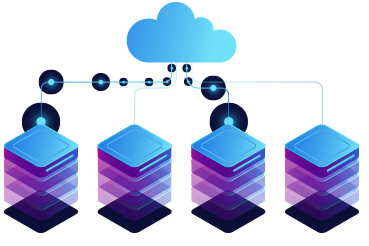
With virtualization, we can create a layer between the hardware of computer systems and the software that runs on it. Of course, in this design, there is a logical view of consumption resources.
The virtualization solution first gives you the ability to recognize a group of servers as a single source of computing to the operating systems, and secondly allows you to install and use several operating systems such as Windows or Linux on one the server gives simultaneously.
Why should we move towards it?
Due to its many advantages, it has caused software development companies to use this technology in their products, and as most software is used in industries, as a result, to compete with other competitors, it is used. (It has more attention in the industry)
One of the best activities in this field is the integration of physical servers into a single server. Virtualization is the main goal of economic saving in the resources of every company. These days, most companies are looking to implement their server integration projects, and it is obvious that after this change, companies will see significant savings in their costs.
Another advantage of it is the reduction of energy consumption and the ease of managing servers and flexibility, because in a virtual environment, we can manage servers more flexibly.
Virtualization
How does it help our business?
Economic savings,
Business agility,
Clustering,
Partitioning,
Workload Management,
Configuring a group of servers,
Better use of available resources.
The difference between the types of virtualization methods:
- Server:
The number and ID of servers, processors and operating systems are hidden from running software.
- Network :
Combining the resources of a network and dividing the available bandwidth to specific servers or devices at a time.
- Storage :
Combining physical storage spaces with storage spaces of devices in the network as one storage device
Virtualization
VMware is one of the leading companies in the field of virtualization.
You can find some learning for this topic here:

by Admin | Nov 27, 2022 | Blog
Building a professional site:
Today, entering the digital world, to introduce products or services, it is almost necessary to Design a website. According to the surveys, when someone visits a website, they are attracted to the website at the first glance or, on the contrary, leave it. No matter what you need a website for, the important thing is that you can keep the user on your site. A high-quality website for business is one of the most essential things of a business. A good site is a sign of excellent quality work.
Online presence is particularly important in Website design:
In the digital world, which is moving fast every day, most people show a great desire to buy online. After the Corona epidemic and being forced to stay at home, as you have seen, the desire to buy online has become much more than before. We all realized that shopping online has been more fun, there is more variety of products and lower cost per purchase.
In online shopping, we can buy from more stores with more products without the cost and time of moving. All these events happen from behind the computer or from inside the phone. With a professional website design, you will have a stunning and impressive website.
Any possibility you need, we will add for you
You can add more features to your website. By creating a website, you can add a blog, daily or weekly useful posts or information about your products and you can interact with your customers and read and respond to their comments under the posts and you can have a live site. To update posts or add them, you can do it yourself or give it to the support so that they can do it for you at an exceptionally low cost according to their expertise. Having a live site in Google ranking is very efficient and useful.
We can make anything you want
Using the most professional website builder software, we customize or change anything you want. Using unique features, such as video in the background, different animations, and different effects, we create a modern site for you.
Online store design
We provide you with everything you need to have a powerful store. Open a successful online store, add your own products, start selling and increase your sales using marketing tools.
We can build your site exactly the way you like it, it doesn’t matter if you are building a site for the first time, the important thing is that you will have a professional site.

Website design
Compatible with phones and tablets
The built sites will be displayed correctly on any device, and you will not lose any visitors.
Faster than competitors
Did you know that 70% of users will leave your site if it takes more than a second to load?
Having a powerful server is especially important to load the site. The bigger your site gets, the more products you have and the more information you provide, the more you feel the need to have a powerful host and programming tricks to reduce site loading time.
You can check some services here.
by Admin | Nov 27, 2022 | Blog
What are IT Consultation services?
IT Consultation are said to use expertise and technology to create a comprehensive improvement of technology in the direction of digital transformation and system optimization.

In this regard, business goals are prioritized, for example, reducing human error, improving the system, and increasing efficiency are prioritized. The mission of strategic IT consulting is to automate and digitize operations, optimize software, and deliver and implement the latest technologies.
IT consulting services help you improve software architecture, software optimization, create digital strategy and improve system performance.
Infrastructure design, planning, budgeting of needs is among other things that can be provided in this service.
What is the difference between IT services and IT consulting?

IT services are deliverable products. For example, it could be a website or a service that eventually leads to a product offering.
But IT consulting services are different. The following steps are for this: assessment, identification of needs, consultation for the best solution. IT consultants are often hire by IT service companies
Facilitate business growth and success at any level with IT consulting services. This service ensures that you get expert advice and continue to work with excellent support and management.
Another one of them is architectural planning consultation.
These services include consulting services, strategic plans, and emerging technologies. In this service, logically design the network environment and infrastructure for migrating to emerging technologies, will examine.
Consulting helps develop a clear and strategic roadmap with priorities for business goals.
- Evaluation of IT equipment
- Network performance analysis and cyber security
- Estimate the budget required to increase system performance
- Providing performance reports and advice
