To add Windows 10 or Windows 11 virtual machines to VMware ESXi, or know `How to add win10,11 to Esxi`, you need to follow these general steps:
Prepare ESXi Host:
Make sure your ESXi host is up and running and that you have administrative access to it.
Download Windows ISO:
Obtain the ISO file for Windows 10 or Windows 11. You can download these from the official Microsoft website or through other authorized channels.
Access ESXi Management Interface:
Open a web browser and navigate to the management interface of your ESXi host. This is usually done by entering the IP address of your ESXi host in the address bar.
Create a New Virtual Machine:
In the ESXi management interface, navigate to the section where you can create a new virtual machine.
Click on “Create/Register VM” or similar option.
Follow the wizard to create a new virtual machine.
Specify the name for your virtual machine (e.g., Windows 10 or Windows 11).
Choose the storage where you want to store the virtual machine files.
Select the appropriate compatibility level. For Windows 10 or 11, you’ll likely choose the latest compatibility level available.
Configure CPU, memory, network settings, and other options as per your requirements.
Install Windows:
Mount the Windows ISO file you downloaded earlier to the virtual machine.
Power on the virtual machine.
Follow the on-screen instructions to install Windows just as you would on a physical machine. This includes selecting language, region, entering license key (if required), and choosing disk partitioning options.
Install VMware Tools:
After installing Windows, it’s recommended to install VMware Tools. This enhances the performance of the virtual machine and enables additional features such as seamless mouse integration and better graphics support.
In the ESXi management interface, select your virtual machine.
Go to “Actions” or “VM” menu and choose “Guest OS” > “Install VMware Tools”.
Follow the instructions to install VMware Tools within the Windows operating system.
Configure Windows:
Once Windows is installed and VMware Tools are installed, configure Windows according to your requirements. This may include installing necessary software, configuring network settings, joining domains, etc.
Optional:
Depending on your needs, you may want to configure additional features such as snapshots, backups, or resource allocation for the virtual machine.
By following these steps, you should be able to successfully add and run Windows 10 or Windows 11 virtual machines on your VMware ESXi host.
https://netvital.ca/what-is-virtualization/
To add a hard disk drive (HDD) to an ESXi host, you typically follow these steps:
Physically Install the HDD:
– Shut down the ESXi host.
– Physically install the HDD into the server, making sure it’s properly connected and recognized by the hardware.
Access ESXi Host:
– Power on the ESXi host.
– Connect to the ESXi host using VMware vSphere Client or VMware vSphere Web Client. You’ll need administrative credentials to log in.
Navigate to Storage:
– In the vSphere Client, go to the ESXi host you want to add the HDD to.
– Navigate to the “Configure” tab.
– Under “Hardware”, select “Storage”.
Rescan for Datastores (Optional):
– If the HDD is not automatically detected, you may need to rescan for datastores. This can be done by right-clicking on the ESXi host and selecting “Rescan for Datastores”.
Add the HDD:
– Click on “Add Storage”.
– Select the “Disk/LUN” storage type.
– Choose the newly added HDD from the list of available devices.
Select Disk Format:
– Choose the disk format. Options typically include VMFS (Virtual Machine File System) or RDM (Raw Device Mapping) depending on your requirements.
– Click “Next”.
Configure Disk Options:
– Specify the datastore name and choose the disk provisioning format (thin or thick).
Review and Complete:
– Review the summary of the settings.
– Click “Finish” to add the HDD.
Monitor the Process:
– Monitor the task progress to ensure that the HDD is successfully added and configured.
Verify:
– Once the process is complete, verify that the HDD appears as a datastore in the list of available storage devices.
It’s important to note that these steps may vary slightly depending on the version of ESXi you’re using and any specific configurations or settings you have in your environment. Always refer to the official VMware documentation or consult with your system administrator for guidance tailored to your specific setup. Additionally, ensure that any data on the HDD is backed up before proceeding with any configuration changes.
Green Lantern is a superhero character appearing in comic books published by DC Comics. The character first appeared in 1940 and has been portrayed by multiple individuals, each chosen to be a part of the intergalactic police force known as the Green Lantern Corps.
The Green Lantern’s power comes from a ring that grants the wearer the ability to create constructs made of solid light energy, limited only by the wearer’s willpower and imagination. Each Green Lantern is chosen by a specific alien race and wields a power ring fueled by a central power battery on the planet Oa.
The most famous Green Lanterns include Hal Jordan, Guy Gardner, John Stewart, Kyle Rayner, and others. Hal Jordan, a test pilot, is often considered the most iconic Green Lantern. He was the first human to join the Green Lantern Corps and is known for his strong willpower and determination in protecting the universe.
The character has appeared in various comic book series, animated shows, video games, and a live-action movie. The Green Lantern Corps continues to be an integral part of the DC Comics universe, fighting against threats to protect the cosmos.
Flash Man is a character from the classic video game series “Mega Man” developed by Capcom. He is one of the Robot Masters created by the nefarious Dr. Wily. Flash Man made his first appearance as a boss character in “Mega Man 2,” which was released for the Nintendo Entertainment System (NES) in 1988.
Flash Man is known for his ability to manipulate time using his Time Stopper weapon. This weapon allows him to briefly freeze time, giving him an advantage during battles. In his stage, players navigate through various obstacles and enemies before facing Flash Man in a boss battle.
Defeating Flash Man grants Mega Man the Time Stopper ability, which can be used against other Robot Masters. Flash Man’s weakness is typically the “Metal Blade” weapon obtained from Metal Man in the game, making it easier for players to defeat him.
The character has become an iconic part of the Mega Man series, remembered for his time-based abilities and challenging boss fight.
(Adversarial Tactics, Techniques, and Common Knowledge)
is a framework developed by MITRE Corporation, a not-for-profit organization dedicated to solving problems for a safer world. ATT&CK is a knowledge base that categorizes the tactics, techniques, and procedures (TTPs) used by adversaries or attackers during cyber intrusions.
The framework provides a comprehensive understanding of how cyber adversaries operate by organizing their behaviors into a matrix. This matrix consists of various tactics that represent high-level objectives an attacker may have (such as initial access, execution, persistence, privilege escalation, etc.) and techniques that represent specific methods or actions used to achieve those objectives.
Each technique is associated with real-world examples of how attackers have historically carried out cyber-attacks. The goal of ATT&CK is to assist organizations in improving their cyber defenses, threat detection, and response capabilities by mapping their security measures to the known tactics and techniques used by adversaries.
It’s widely used in cybersecurity for several purposes, including threat intelligence, red teaming, blue teaming, security assessments, and improving security posture by identifying and mitigating potential attack vectors based on known adversary behaviors. The framework is continuously updated and expanded to reflect the evolving landscape of cyber threats and attack methodologies.
Here are some examples of techniques related to Initial Access in the MITRE ATT&CK framework:
Spear phishing Attachment (T1566.001):
Attackers send tailored emails with malicious attachments to trick users into opening them, leading to the execution of malicious code.
Spear phishing Link (T1566.002):
Attackers send tailored emails containing links to malicious websites or resources to trick users into clicking, leading to exploitation or malware installation.
Valid Accounts (T1078):
Attackers use previously obtained credentials, such as stolen or purchased credentials, to gain unauthorized access.
External Remote Services (T1133):
Attackers exploit externally accessible services, such as VPNs or web services, to gain initial access to a network.
Exploit Public-Facing Application (T1190):
Attackers exploit vulnerabilities in public-facing applications, such as web servers, to gain access to the targeted network.
Drive-by Compromise (T1189):
Attackers compromise a legitimate website to host and deliver malicious content to visitors’ systems.
Phishing (T1566):
Attackers send deceptive communications (email, SMS, etc.) to trick individuals into divulging sensitive information or performing actions that compromise security.
Supply Chain Compromise (T1195):
Attackers target suppliers or vendors to gain access to their networks, which in turn could provide access to the targeted network.
These are just a few examples; the MITRE ATT&CK framework covers a wide array of tactics and techniques used by adversaries during different stages of a cyberattack. Each technique may have various sub-techniques and mitigations associated with it, providing a comprehensive understanding of potential threats and appropriate defenses.
You can find other learning for Security by clicking here.
In these series we have some “Sample Exams of Cybersecurity”, “Practice Cybersecurity Examinations”, “Cybersecurity Test Previews” and “Mock Cybersecurity Tests”
McCumber CUBE:
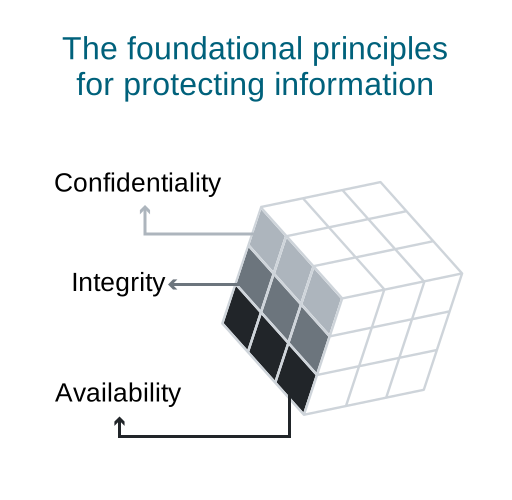
This could refer to a cybersecurity risk management framework developed by John McCumber, known as the McCumber Cube. It provides a structured way of understanding and managing security risks within an organization by considering three dimensions: confidentiality, integrity, and availability (often referred to as the CIA triad).
McCumber diagram:
In software engineering, the McCumber diagram is a graphical representation used to depict various dimensions of security in a system. It can display information regarding security attributes, vulnerabilities, threats, and countermeasures.
McCumber’s model or theories:
John McCumber is known for his contributions to cybersecurity and philosophy. He has written about the intersection of philosophy and technology, exploring the ethical and moral aspects of information security.
Cyberwarfare:
Cyberwarfare refers to the use of digital attacks, hacking, and other technological means to disrupt, damage, or gain unauthorized access to computer systems, networks, or information. The purpose of cyberwarfare can vary significantly based on the objectives of the parties involved. Here are some primary purposes or objectives associated with cyberwarfare:
National Security and Defense: Nations engage in cyberwarfare to protect their national security interests. This includes defending against cyber-attacks from other countries, safeguarding critical infrastructure (such as power grids, financial systems, and communication networks), and ensuring the security of military systems.
Espionage and Intelligence Gathering: Cyberwarfare is used for espionage purposes, allowing nations to gather intelligence on other countries, including government activities, military strategies, economic data, and technological advancements. This information can be used for strategic advantage or to stay informed about potential threats.
Political Influence and Manipulation: Some cyber operations aim to influence political processes, public opinion, or elections in other countries. This can involve spreading misinformation, manipulating social media, or breaching sensitive data to sway public sentiment or disrupt the political landscape.
Economic Warfare: Cyber-attacks can be used to sabotage or gain access to economic assets, trade secrets, intellectual property, or financial systems of other countries or corporations. Such attacks can cause significant economic damage or provide economic advantages to the attacking entity.
Military Operations and Warfare: Cyber capabilities are increasingly integrated into military strategies. They can be used to disrupt or disable enemy communication systems, command-and-control infrastructure, or weapon systems, creating advantages in traditional warfare scenarios.
Deterrence and Posturing: Nations may engage in cyber operations to highlight their capabilities, act as a deterrent against potential adversaries, or demonstrate their preparedness in the cyber domain. This serves to dissuade others from launching cyber-attacks or to signal the ability to retaliate effectively.
Non-state Actors and Ideological Motives: Some cyber-attacks are carried out by non-state actors, such as hacker groups or cybercriminals, for ideological reasons, financial gain, or to promote a specific agenda. These attacks might not be linked to state-sponsored cyberwarfare but can still cause significant disruptions.
It’s important to note that the landscape of cyberwarfare is complex and constantly evolving. Attribution of attacks, distinguishing between state and non-state actors, and the interconnected nature of cyberspace pose significant challenges in understanding and responding to cyber threats effectively. As technology advances, the purposes and methods of cyberwarfare will continue to evolve, requiring ongoing vigilance and adaptation in defensive and offensive strategies.
You can find other learning for Security by clicking here.
 To add Windows 10 or Windows 11 virtual machines to VMware ESXi, or know `How to add win10,11 to Esxi`, you need to follow these general steps: