Sample Exams (Type of Attack, Hat)

Sample Exams (Type of Attack, Hat)

Sample Exams of Cybersecurity

In these series we have some “Sample Exams of Cybersecurity”, “Practice Cybersecurity Examinations”, “Cybersecurity Test Previews” and “Mock Cybersecurity Tests”


Type of Attack:

1. Hacktivists:

These are individuals or groups who engage in hacking activities to promote a social or political agenda. Their goal is to raise awareness or effect change through their actions.

2. Cybercriminals:

Cybercriminals are motivated by financial gain. They may engage in activities like stealing personal information, credit card data, or conducting ransomware attacks to demand money from victims.

3. Nation-State Actors:

Governments and state-sponsored groups conduct cyber-espionage and cyber-attacks to gain a competitive advantage, steal sensitive information, or disrupt the infrastructure of other nations.

4. Insiders:

Insiders are individuals within an organization who misuse their authorized access to commit cybercrimes. They can be current or former employees, contractors, or business partners.

5. Script Kiddies:

These are individuals with limited technical skills who use pre-written scripts or tools to launch attacks. They often do it for the thrill rather than any specific goal.

6. Organized Crime Groups:

Some cybercriminals operate as part of organized crime networks. They may engage in activities like credit card fraud, identity theft, or cyber-extortion.

7. Phishers:

Phishers use social engineering techniques to trick individuals into revealing sensitive information, such as usernames, passwords, and financial data. They often send fraudulent emails or messages that are from legitimate sources.

8. Malware Authors:

Individuals who create and distribute malicious software, such as viruses, Trojans, and ransomware. Their goal is to infect computers and steal data or disrupt operations.

9. Advanced Persistent Threat (APT) Actors:

APT groups are typically nation-state or highly skilled attackers who use sophisticated, long-term attacks to infiltrate and maintain access to a target network. Their primary goals are espionage or data theft.

10. Hackers for Hire:

These are individuals or groups that offer hacking services to the highest bidder. They can be hired for various purposes, including corporate espionage, data theft, or taking down websites.

11. Data Brokers:

Data brokers gather, compile, and sell personal information and data obtained from various sources. While not directly engaging in hacking, their activities can indirectly support cybercrime by providing stolen data to other attackers.

12. Extortionists:

Extortionists threaten to expose sensitive information or launch attacks on a target unless a ransom is paid. Ransomware attacks are a common method used by extortionists.

13. Cybersecurity Researchers (Ethical Hackers):

While not attackers in the malicious sense, ethical hackers, or white hat hackers, actively seek vulnerabilities in systems and networks to help organizations strengthen their security.

14. Unintentional Threats:

Sometimes, individuals may inadvertently pose a security threat through their actions, such as falling victim to phishing attacks or using weak passwords. They are not malicious attackers but can inadvertently compromise security.

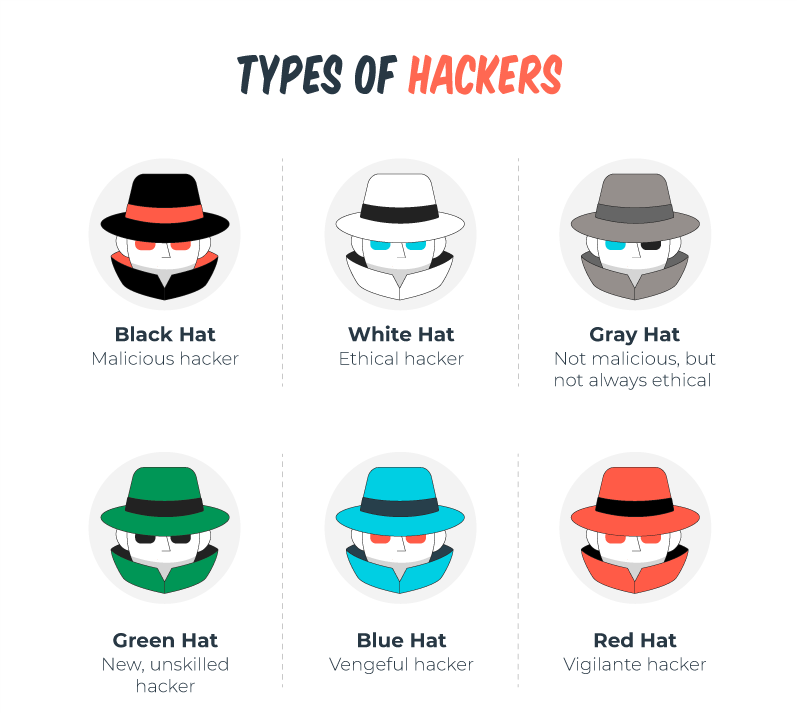
What Color Is My Hat of Attackers on cyber security?


White Hat:

White hat hackers are ethical hackers who work to identify and fix security vulnerabilities in systems. They are often employed by organizations to conduct penetration testing and security assessments to improve security.

Black Hat:

Black hat hackers are malicious hackers who engage in cybercriminal activities, such as hacking for financial gain, stealing sensitive data, or causing harm to computer systems and networks.

Gray Hat:

Gray hat hackers fall somewhere in between white hat and black hat hackers. They may discover and disclose security vulnerabilities without authorization but without malicious intent. However, their actions may still be legally questionable.

Red Team:

A red team is a group of skilled professionals who simulate cyberattacks to test the security of an organization’s systems. They can be either internal or external to the organization.

Blue Team:

Blue team refers to the defenders of a network or system. They work to prevent and mitigate cyberattacks and respond to security incidents.


You can find other learning for Security by clicking here.
Sample Exams (Malware, confidentiality, McCumber Cube)

Sample Exams (Malware, confidentiality, McCumber Cube)

Sample Exams of Cybersecurity

In these series we have some “Sample Exams of Cybersecurity”, “Practice Cybersecurity Examinations”, “Cybersecurity Test Previews” and “Mock Cybersecurity Tests”

Which of the following would be classified as personal data? (1,2,3)

You can find other learning for Security by clicking here.

Sample Exams (Improved Security)

Sample Exams (Improved Security)

Sample Exams of Cybersecurity

In these series we have some “Sample Exams of Cybersecurity”, “Practice Cybersecurity Examinations”, “Cybersecurity Test Previews” and “Mock Cybersecurity Tests”

What organizations need to invest in improved security practices?
  • investing in cybersecurity training for all staff so that they are aware of and able to spot a cyber attack
  • enforcing two factor authentication for employees accessing files and applications that contain sensitive data
  • maintaining log files and ongoing monitoring to identify anomalous behavior that might indicate a data breach
  • storing the passwords of customers using a combination of salting and robust hashing algorithms
  • separating cloud-based resources from the public Internet into an isolated private network segment
  • granting employees access to personal data and internal systems only via a secure VPN connection.
Data Breach:
    • What was taken? Personal information, financial data, or sensitive company data.
    • Exploits: Typically involve phishing attacks, malware, or vulnerabilities in web applications.
    • Prevention: Employ strong access controls, regular security training for employees, and keep software and systems up to date. Implement encryption and multi-factor authentication.
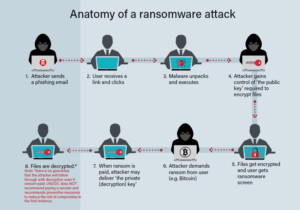
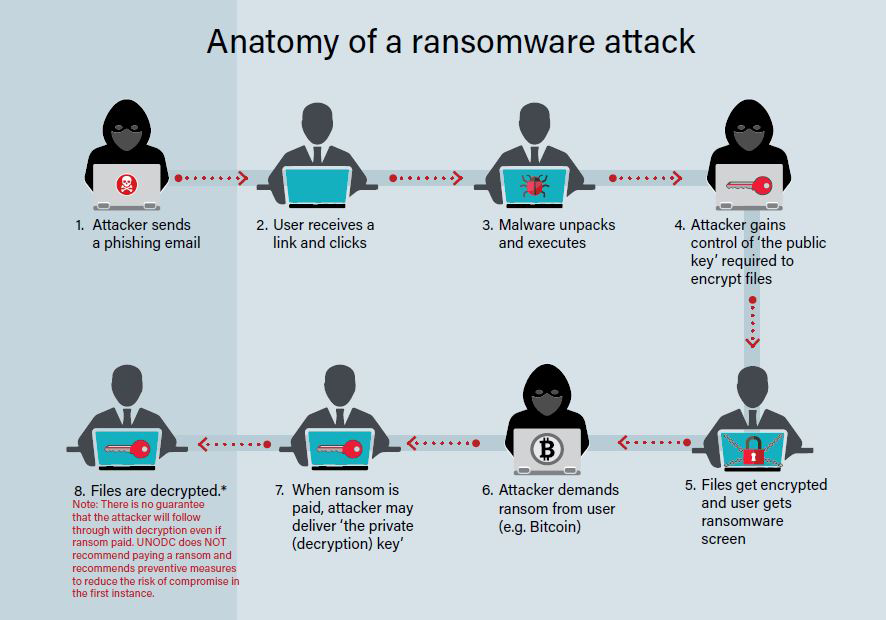
Ransomware Attack :
    • What was taken? Access to and encryption of data until a ransom is paid.
    • Exploits: Usually initiated through phishing emails or exploiting vulnerabilities in software.
    • Prevention: Regularly backup data, use robust endpoint security software, and educate employees about the dangers of opening suspicious attachments or links.
Distributed Denial of Service (DDoS) Attack:
    • What was taken? Temporarily disrupts a website or online service.
    • Exploits: Overwhelms the target with a flood of traffic from multiple sources.
    • Prevention: Implement DDoS mitigation tools, maintain redundancy in systems, and employ monitoring for unusual traffic patterns.
Insider Threat:
    • What was taken? Sensitive information or malicious actions by employees or contractors.
    • Exploits: Exploitation of internal access or data theft.
    • Prevention: Implement strong access controls, monitoring, and auditing of user activity, and establish clear security policies and procedures.
Zero-Day Vulnerability Exploits:
    • What was taken? Unauthorized access to systems or data.
    • Exploits: Attackers target vulnerabilities in software that are unknown to the vendor.
    • Prevention: Stay informed about software updates and patches, use intrusion detection systems, and employ good vulnerability management practices.


You can find other learning for Security by clicking here.

Can eat banana?

Can eat banana?

Can Cockatiels eat banana?

Yes, cockatiels can eat bananas in moderation. Bananas are safe for cockatiels to consume and can be a healthy treat when given in appropriate amounts. They are a good source of vitamins, minerals, and dietary fiber.

However, like with any treat, it’s important to remember a few key points:

Moderation:

While bananas are safe, they are also high in natural sugars. Too much sugar can be unhealthy for birds. Offer small, bite-sized pieces occasionally, not as a primary food source.

Variety:

A healthy diet for a cockatiel should consist primarily of high-quality pelleted bird food, supplemented with fresh vegetables, fruits, and occasionally seeds.

Preparation:

Make sure to wash the banana thoroughly and remove the peel. You can cut the banana into small, manageable pieces for your cockatiel to eat.

Freshness:

Only offer fresh bananas. Remove any uneaten portions from the cage after a few hours to prevent spoilage.

Watch for Allergies:

Just like humans, some birds might have sensitivities or allergies to certain foods. Watch for any adverse reactions after introducing bananas for the first time.

Remember that every bird is different, and preferences and tolerances can vary. If you’re unsure about introducing new foods into your cockatiel’s diet, it’s always a good idea to consult with an avian veterinarian. They can provide you with personalized advice based on your bird’s specific needs and health considerations.


You can check more videos in our Youtube Channel.

If you want to learn more, you can check other Posts

Sample Exams (Blockchain, U.S. Dep Certification)

Sample Exams (Blockchain, U.S. Dep Certification)

Sample Exams of Cybersecurity

In these series we have some “Sample Exams of Cybersecurity”, “Practice Cybersecurity Examinations”, “Cybersecurity Test Previews” and “Mock Cybersecurity Tests”

Which certifications meets the U.S. Department of Defense Directive 8570.01-M requirements, which is important for anyone looking to work in IT security for the federal government?

As of my last knowledge update in January 2022, the U.S. Department of Defense Directive 8570.01-M (DoD 8570) established requirements for the certification and training of personnel working in Information Assurance (IA) roles within the Department of Defense (DoD). These requirements were important for anyone looking to work in IT security for the federal government, including contractors and military personnel.

DoD 8570 classified certifications into various categories, based on the level and function of the IT or IA position. These categories included:

  1. Information Assurance Technical (IAT) Levels:
    • IAT Level I: Typically required for entry-level positions.
      • CompTIA A+
      • CompTIA Network+
    • IAT Level II: Required for mid-level positions.
      • CompTIA Security+
      • Cisco Certified Network Associate (CCNA) Security
      • Certified Information Systems Security Professional (CISSP) (Associates)
      • Certified Information Systems Auditor (CISA)
    • IAT Level III: Typically required for senior-level positions.
      • Certified Information Systems Security Professional (CISSP)
      • Certified Information Systems Security Manager (CISM)
  2. Information Assurance Managerial (IAM) Levels:
    • IAM Level I: Required for those managing entry-level positions.
      • Security+ CE
    • IAM Level II: Typically required for those managing mid-level positions.
      • Certified Information Security Manager (CISM)
      • Certified Information Systems Security Professional (CISSP)
    • IAM Level III: Required for those managing senior-level positions.
      • Certified Information Systems Security Professional (CISSP)
  3. Information Assurance System Architecture and Engineering (IASAE):
    • IASAE Level I: Typically required for entry-level positions.
      • CompTIA Advanced Security Practitioner (CASP+)
    • IASAE Level II: Required for mid-level positions.
      • Certified Information Systems Security Professional (CISSP)
      • Certified Information Security Manager (CISM)
    • IASAE Level III: Typically required for senior-level positions.
      • Certified Information Systems Security Professional (CISSP)

Please note that certification requirements and lists can change over time, and the DoD may update its guidelines or policies after my last knowledge update. It’s essential to consult the latest DoD 8570.01-M documentation or official sources for the most current information regarding certification requirements for IT security positions in the federal government.

Additionally, the DoD often emphasizes the importance of continuous education and professional development, so staying updated and pursuing higher-level certifications can be beneficial for your career in IT security within the federal government.

Who is responsible for overseeing a blockchain electronic ledger?

The responsibility for overseeing a blockchain electronic ledger can vary depending on the type of blockchain and its governance model. Here are a few key points to consider:

  1. Public Blockchains (e.g., Bitcoin, Ethereum): Public blockchains are typically decentralized, and no single entity oversees the entire ledger. Instead, a network of nodes (computers) collectively maintains and validates the blockchain. Miners (in the case of Proof of Work blockchains like Bitcoin) or validators (in the case of Proof of Stake blockchains like Ethereum 2.0) are responsible for adding new blocks to the blockchain and reaching consensus on the state of the ledger.
  2. Private Blockchains: In private or permissioned blockchains, a designated entity or a consortium of organizations often oversees the blockchain ledger. These entities have control over the network, decide who can participate, and may have the authority to make changes to the ledger.
  3. Consortium Blockchains: Consortium blockchains are governed by a group of organizations working together. They share responsibilities for maintaining and validating the ledger. Consortium members often have varying degrees of influence and control over the network.
  4. Hybrid Blockchains: Some blockchains may have a combination of public and private elements, and their governance structure can be a mix of decentralized and centralized control.
  5. Smart Contract Platforms: Smart contract platforms like Ethereum have a decentralized model where no single entity oversees the entire network. Instead, it relies on a global network of nodes to validate transactions and execute smart contracts.
  6. Governance Tokens: In some blockchain networks, the community and token holders play a role in decision-making. They may use governance tokens to vote on changes to the protocol, upgrades, or other important matters.

It’s important to note that the specific governance structure and who oversees a blockchain ledger can vary widely. Additionally, governance models may evolve over time as the blockchain community or consortium adapts to changing needs and circumstances.

You can find other learning for Security by clicking here.
Are walnuts safe?

Are walnuts safe?

Are walnuts safe for Cockatiels?

Cockatiels are omnivorous birds and have a varied diet in the wild, which includes seeds, fruits, vegetables, and some insects. now question is : Are walnuts safe? While walnuts can be included in a cockatiel’s diet occasionally, they should be given in moderation due to their high fat content.

Here are some considerations:

Moderation:

Walnuts are high in fat, which can be beneficial for cockatiels in small amounts, especially during molting or in colder weather when they may need extra energy. However, excessive fat intake can lead to obesity and health issues in birds.

Nutritional Variety:

Cockatiels should have a varied diet to ensure they receive all the necessary nutrients. Walnuts should only be a part of this variety and not a staple food.

Preparation:

If you choose to feed walnuts to your cockatiel, ensure they are unsalted and unseasoned. Remove the shell and break the nut into small, manageable pieces to prevent choking hazards.

Freshness:

Always provide fresh nuts to your cockatiel. Stale or rancid nuts can be harmful to birds.

Observe:

Pay attention to your cockatiel’s reaction to walnuts. Some birds may enjoy them, while others may not be interested. If your cockatiel seems to like walnuts, you can offer them as an occasional treat.

Remember that a balanced diet for a cockatiel should primarily consist of high-quality pellet or seed mixes designed for cockatiels, along with fresh fruits and vegetables. Walnuts should not replace these essential components but can be offered as an occasional supplement to add variety to their diet. It’s also a good idea to consult with an avian veterinarian for specific dietary recommendations tailored to your cockatiel’s individual needs.

You can check more videos in our Youtube Channel.

If you want to learn more, you can check other Posts

Microsoft Intune, “Retire,” “Wipe,” and “Delete”

Microsoft Intune, “Retire,” “Wipe,” and “Delete”

Microsoft Intune, “Retire,” “Wipe,” and “Delete”

In Microsoft Intune, “Retire,” “Wipe,” and “Delete” are actions you can take when managing mobile devices and sometimes computers. These actions are used to control and secure the data and settings on the devices.

1- Retire:
  • Purpose: Retiring a device means marking it as no longer needed or in use. It’s a way to indicate that the device is no longer managed by the organization.
  • Effects: When you retire a device, it typically removes company data and settings associated with that device, but it doesn’t wipe the entire device or delete personal data.
  • Use Case: You would use the retirement option when an employee leaves the company, and you want to remove their access to company resources without wiping their personal data.
2- Wipe:
  • Purpose: Wiping a device means removing all data and settings on the device, returning it to its factory state. It’s a more drastic action than retiring and is typically used in cases where the device is lost, stolen, or when more thorough data removal is necessary.
  • Effects: Wiping a device will erase all data on the device, including both company and personal data. It resets the device to its original configuration.
  • Use Case: You would use the wipe option when a device is lost or stolen, or when you need to decommission a device and ensure no company data remains on it.
3- Delete:
  • Purpose: Deleting a device removes it from the Intune console and revokes its management capabilities. It’s a way to permanently remove a device from the organization’s Intune account.
  • Effects: Deleting a device removes it from management but does not wipe the device or affect the data on it.
  • Use Case: You would use the delete option when you no longer need to manage a device with Intune, such as when a device is no longer in use or is being replaced.

The difference between ‘Retire’, ‘Wipe’, and ‘Delete’ in Intune device management is as follows:

  • Retire:
    • removes app data, settings, and Intune managed email profiles from the device. The device will still show up in Intune until the device checks in. Retirement leaves users’ personal data on the device. Retire also removes the Azure AD record of the device, unless the device has an Autopilot hash assigned³.
  • Wipe :
    • restores a device to its factory default settings. All data, apps, and settings are removed. Wipe also removes the device from Intune management and Azure AD, unless the device has an Autopilot hash assigned³. Wipe is useful for resetting a device before giving it to a new user, or when the device has been lost or stolen.
  • Delete:
    • removes the device from the All-devices list in Intune immediately. Delete also issues the retire command to the device, which removes app data, settings, and Intune managed email profiles from the device. Delete also removes the Azure AD record of the device, unless the device has an Autopilot hash assigned³.


It’s important to understand the differences between these actions and use them appropriately based on your organization’s policies and the specific circumstances for each device. Always exercise caution when performing actions like wiping or deleting, as they can result in data loss on the device. It’s also good practice to communicate with the device owner or user before taking such actions, especially when dealing with personal devices.


Now, let’s to see the video from our YouTube channel:

You can find all learning for Azure by clicking here.

Install Active Directory on Server

Install Active Directory on Server

How to Install Active Directory on Server ?

Installing Active Directory on a Windows Server involves several steps. Active Directory is a directory service provided by Microsoft for Windows network environments. It allows you to manage users, computers, and other network resources in a centralized and secure manner. Here’s a step-by-step guide on how to install Active Directory on a Windows Server:

Note: You’ll need to have a Windows Server operating system installed on your server before you can install Active Directory. Additionally, make sure your server has a static IP address and DNS settings configured correctly.

Open Server Manager:

Log in to your Windows Server, and the first step is to open the Server Manager. You can usually find it on the taskbar or in the Start menu.

Add Roles and Features:
    • In Server Manager, click on “Manage” in the top-right corner and select “Add Roles and Features.”
    • Click “Next” on the “Before you begin” page.
Installation Type:
    • Choose “Role-based or feature-based installation” and click “Next.”
Destination Server:
    • Select the server where you want to install Active Directory and click “Next.”
Server Roles:
    • Scroll down and find “Active Directory Domain Services.” Check the box next to it.
    • A dialog box will pop up asking you to add features that are required for Active Directory Domain Services. Click “Add Features.”
    • Click “Next.”
Add Features (Optional):
    • If prompted to add any required features, simply click “Next.”
Active Directory Domain Services:
    • Read the information provided about Active Directory Domain Services and click “Next.”
Confirm Installation Selections:
    • Review your selections. If everything looks correct, click “Install.”
Installation Progress:
    • The installation process will begin. It may take a few minutes.
Installation Results:
    • After the installation is complete, you should see a “Installation succeeded” message. Click “Promote this server to a domain controller.”
Deployment Configuration:
    • In the “Deployment Configuration” section, select “Add a new forest” if you are creating a new Active Directory Forest. If you are adding this server to an existing forest, select the appropriate option.
    • Enter a root domain name for your Active Directory Forest (e.g., mydomain.local). Choose a name that is unique to your network.
    • Set a Directory Services Restore Mode (DSRM) password. This is a critical password used for recovery purposes.
    • Click “Next.”
Domain Controller Options :
    • Choose the appropriate options for your environment, such as DNS and Global Catalog. The default options are usually suitable for most scenarios.
    • If your server is the first domain controller in your environment, it will automatically become the DNS server.
    • Click “Next.”
Additional Options:
    • Configure any additional options as needed for your environment. These options include the paths for the Active Directory database, log files, and system volume (SYSVOL).
    • Review the summary of your selections and click “Next.”
Review Options and Prerequisites:
    • The system will perform a prerequisite check. Ensure there are no errors or warnings and click “Install” to proceed.
Active Directory Installation:
    • The installation process will begin, and your server will be configured as a domain controller.
Completion:
    • Once the installation is complete, your server will restart.

After the server restarts, Active Directory will be installed and ready for use. You can then start managing users, groups, and other directory objects through Active Directory Users and Computers, which can be found in the Administrative Tools or accessed through Server Manager.

let’s to see video from our YouTube channel

Please check more post for Windows Server

Create User in Azure

Create User in Azure

Create User in Azure Active Directory

In this part, we want to create user in Azure with portal Azure. With the Admin role we can login and try to create users.

For starting we login to this link. https://portal.azure.com/

To add a new user in Azure Active Directory (Azure AD), you typically have a few different methods to choose from, depending on your needs and preferences. Here’s a common method using the Azure portal:

Sign in, to Azure Portal:

Sign in, to your Azure portal using your admin account

Access Azure Active Directory :

Click on “Azure Active Directory” in the left-hand menu. If you can’t find it, you can also use the search bar to locate it quickly.

Add a New User:

There are a few ways to add a new user, but the most common one is to go to “Users” under “Manage.” Click on the “+ New user” button. With two ways we can create user:

    • Create user
    • Invite user
User Details:

You’ll be prompted to enter the user’s details. These typically include:

    • Username: The user’s username, which is used for signing in.
    • Name: Full name of the user.
    • Profile: You can set the user’s job title, department, and more.
    • User type: Depending on your subscription, you can choose between “Member,” “Guest,” or “External.”
Authentication and Role Assignment:

You’ll set the user’s role and authentication method. Here, you can choose roles like “User” or “Global Administrator.” You’ll also set their password and authentication method, whether it’s a temporary password or you let them create their own.

Directory Role:

Depending on your needs, you might want to assign the user to directory roles, like “User administrator” or “Application administrator.”

Groups:

You can also add the user to Azure AD security groups if needed.

Review and Create:

Review the user’s details and settings. Make sure everything is correct.

Create:

Once you’re satisfied, click “Create” to add the user to Azure AD.


The user should now be added to Azure AD. They will receive an email (if you provided their email address) to set up their account or change their temporary password.

Please note that the specific steps and options may vary depending on the version of Azure and your subscription level. Always ensure that you have the necessary permissions and follow best practices for user management and security in your organization.


Now, let’s to see the video from our YouTube channel:

You can find all learning for Azure by clicking here.

Which bird is the noisiest?

Which bird is the noisiest?

Which bird is the noisiest?

The bird that is reputed to be the loudest bird is the African gray parrot.

African Grey Parrots are known for their exceptional talking and mimicry abilities. They can imitate human speech, sounds, and even laughter, making them a popular pet bird species.

Their intelligence and social nature also contributes to their noise level, as they like to communicate with their owners and their surroundings. Other noisy bird species include the Cockatoo, Macaw, and Amazon parrot.


African Grey Parrots are highly social birds that form strong bonds with their owners. They are playful, curious, and intelligent birds that enjoy interacting with their surroundings and engaging in various activities.

They are also known for their independent streak and can become destructive if they get bored or neglected. It is important for their owners to provide them with plenty of mental stimulation and physical exercise to keep them happy and healthy.

African Grey Parrots are also very social birds and enjoy the company of their own kind and their human caretakers. They are affectionate and bond well with their owners, often developing a close relationship and exhibiting loyal behavior.


The African Grey Parrot is native to the rainforests of West and Central Africa. They are typically in countries such as Ivory Coast, Ghana, and Cameroon, where they live in flocks in the tall trees of the dense forest.

These parrots are on a variety of foods including nuts, seeds, and fruits, and are known for their distinctive grey feathers and red tail feathers. The African Grey Parrot is widely regarded as one of the most intelligent bird species and is a popular pet bird due to its ability to imitate human speech and sounds.


African Grey Parrots have a lifespan of 40 to 60 years in captivity with proper care. In the wild, their lifespan is typically shorter due to factors such as predation and disease. These birds have a long lifespan and require a long-term commitment from their owners.

They require a nutritious diet, regular exercise, and plenty of mental stimulation to maintain their health and wellbeing. It is also important to provide them with a spacious cage or aviary and to give them plenty of opportunities to interact with their owners and their surroundings to help prevent boredom and destructive behavior. By providing proper care and attention, African Grey Parrots can live long and happy lives.


You can check more videos in our Youtube Channel.

If you want to learn more, you can check other posts.