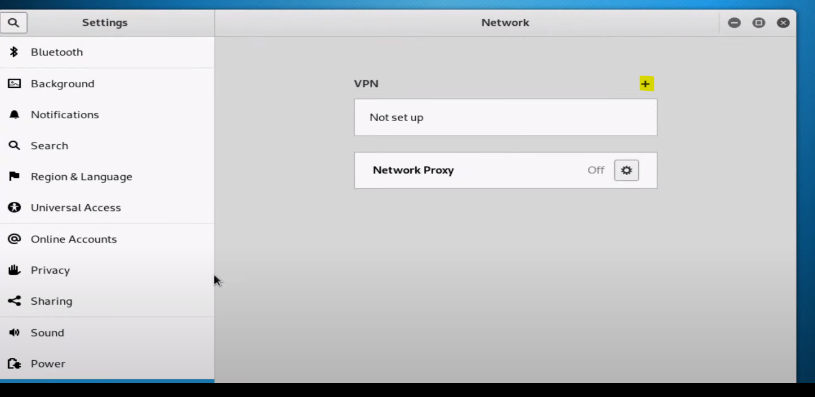
Sometimes when we install Kali Linux, we have Interface problem and we don’t have any interface in the network settings at first, in this tutorial we will teach you, how we can add an interface and make the corresponding settings.
We check some setting in Kali Linux:
First, we can check settings and if we can add interface, we do it by graphic mode. If the option to add was off and we cannot add it, then we try by command.
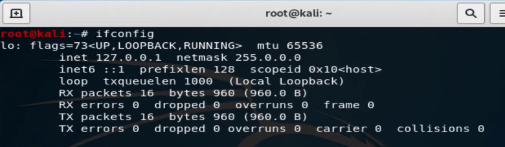
To check setting by command we type ifconfig. If any interface was on, you can have in result
note: Inet 127.0.0.1 netmask 255.0.0.0 is not active interface
You cannot see any interface and IP; we go next steps. also, we can check it with ping 8.8.8.8
Command DHClient:
The DHCP protocol requests an available IP address from a server or IP provider, which may be assigned in one or more subnets. A DHCP client may request an address from this pool and then use it temporarily on the network. Also, when requesting an IP address, a client can get more details about the connected network, such as the range IP, Gateway, name server, etc.
When running the dhclient command, the dhclient.conf file is called for configuration. It then gets a complete list of network settings configured on the current system and attempts to configure the interface using the DHCP protocol.
The DHCP Client or dhclient command is a tool for configuring a network interface using the Dynamic Host Configuration Protocol
with command #man dhclientyou can get more information about this command in Linux:
Today, entering the digital world, to introduce products or services, it is almost necessary to Design a website. According to the surveys, when someone visits a website, they are attracted to the website at the first glance or, on the contrary, leave it. No matter what you need a website for, the important thing is that you can keep the user on your site. A high-quality website for business is one of the most essential things of a business. A good site is a sign of excellent quality work.
Online presence is particularly important in Website design:
In the digital world, which is moving fast every day, most people show a great desire to buy online. After the Corona epidemic and being forced to stay at home, as you have seen, the desire to buy online has become much more than before. We all realized that shopping online has been more fun, there is more variety of products and lower cost per purchase.
In online shopping, we can buy from more stores with more products without the cost and time of moving. All these events happen from behind the computer or from inside the phone. With a professional website design, you will have a stunning and impressive website.
Any possibility you need, we will add for you
You can add more features to your website. By creating a website, you can add a blog, daily or weekly useful posts or information about your products and you can interact with your customers and read and respond to their comments under the posts and you can have a live site. To update posts or add them, you can do it yourself or give it to the support so that they can do it for you at an exceptionally low cost according to their expertise. Having a live site in Google ranking is very efficient and useful.
We can make anything you want
Using the most professional website builder software, we customize or change anything you want. Using unique features, such as video in the background, different animations, and different effects, we create a modern site for you.
Online store design
We provide you with everything you need to have a powerful store. Open a successful online store, add your own products, start selling and increase your sales using marketing tools.
We can build your site exactly the way you like it, it doesn’t matter if you are building a site for the first time, the important thing is that you will have a professional site.
Website design
Compatible with phones and tablets
The built sites will be displayed correctly on any device, and you will not lose any visitors.
Faster than competitors
Did you know that 70% of users will leave your site if it takes more than a second to load?
Having a powerful server is especially important to load the site. The bigger your site gets, the more products you have and the more information you provide, the more you feel the need to have a powerful host and programming tricks to reduce site loading time.
IT Consultation are said to use expertise and technology to create a comprehensive improvement of technology in the direction of digital transformation and system optimization.
In this regard, business goals are prioritized, for example, reducing human error, improving the system, and increasing efficiency are prioritized. The mission of strategic IT consulting is to automate and digitize operations, optimize software, and deliver and implement the latest technologies.
IT consulting services help you improve software architecture, software optimization, create digital strategy and improve system performance.
Infrastructure design, planning, budgeting of needs is among other things that can be provided in this service.
What is the difference between IT services and IT consulting?
IT services are deliverable products. For example, it could be a website or a service that eventually leads to a product offering.
But IT consulting services are different. The following steps are for this: assessment, identification of needs, consultation for the best solution. IT consultants are often hire by IT service companies
Facilitate business growth and success at any level with IT consulting services.This service ensures that you get expert advice and continue to work with excellent support and management.
Another one of them is architectural planning consultation.
These services include consulting services, strategic plans, and emerging technologies. In this service, logically design the network environment and infrastructure for migrating to emerging technologies, will examine.
Consulting helps develop a clear and strategic roadmap with priorities for business goals.
This Service includes technical support and customer assistance by phone, in person and remotely. This service is offered monthly or once. You can discuss the problems with the service team by email or chat and get the necessary guidance as soon as possible.
The main purpose of the Help Desk Service is to ensure customer satisfaction and the ability to operate any machine you may have a problem with.
What is an IT Help Desk?
IT Helper hire with the department Service and help their customers for computer, hardware, or software problems when a problem occurs. The IT Technician must have sufficient knowledge and awareness to interact with the customer and be able to understand the customer’s needs and solve their problems as quickly as possible.
They often receive the first contact from users based on chat, email, or phone call. An IT Technician is responsible for providing support, troubleshooting, or technical assistance. They interact with their customers to solve problems and help them to solve the problem.
What happened when you contacted the IT help desk?
At this stage, technicians get your issue with email, chat, or telephone and they process it, they will contact you for technical assistance by phone or email. They perform remote troubleshooting, through diagnostic techniques and related questions, and then provide the best solution based on the issue and details that customers have mentioned.
Some process examples for Help Desk Services
Receive calls for customers seeking technical assistance via phone or email.
Remote troubleshooting through diagnostic techniques and related questions.
Providing solutions based on the topic and details provided.
Help the customer to solve the problem.
What is Help desk software?
It is software that enables a company or an individual to support its customers in the shortest possible time.
One of the main topics of computer networks is Network Security. After configuring and deploying the hardware, we must pay special attention to this topic. In this section, we will examine the following:
What is computer network security?
Wireless networks
Firewall
What is computer network security?
It includes things like software used, data stored, and information theft.Everything that is used in a computer network system (both software and hardware) must be protected against attacks and risks.
Three principal factors are needed in the security of a computer network, these three factors (CIA) are the basic principles of information-security in information storage and exchange environments.
Confidentiality
integrity
Availability
Confidentiality:
That is, the information should be available only to those who need it.For example, leaving part of a company’s confidential file
Integrity:
Just authorized persons or instructions can change system
authorized people or processes cannot change system without permission and without reason,
It is necessary to maintain the integrity of information inside and outside the system, and it must be the same inside and outside the system, and if the information changes, they must be aware of it both inside and outside the system.
Availability:
Information should always be available and able to do its job, and there should never be a factor that disrupts the system’s work.For example, if the power goes out and we don’t have a solution for it, this system is not safe.
There are many concepts in the discussion of network security, which can be mentioned as these basic concepts:
Identification: requesting identification when the user accesses the system,
Authentication: specifying the user’s identity
Authorization: the level of user access to resources.
Accountability: ability to audit system performance
If you are interested in seeing some learning, you can click here.