in this post we want to know what is Cloud Service? Cloud services are one of the popular services in the web and technology world. In this section, we want to examine cloud services (Like Azure, Google, Amazon).
What are cloud services?
Cloud services are a set of services that are provided based on cloud architecture and on the Internet. Cloud services can be provided in different forms.
IaaS:The name of these services stands for Infrastructure as a Service and includes bandwidth, processing, or similar services. For example, we can mention Amazon’s web services.
PaaS:The name of this service stands for Platform as a Service and in this space, users can develop software. In this service, we can use hardware resources for software development. For example, we can mention Force.com service. Of course, other companies also provide other forms of these services.
SaaS:The name of this service stands for Software as a Service and this form is the most important service provided by the cloud service on the Internet. For example, when you log into your Gmail account and Google Drive, you will see a collection of software based on these services. We can also mention the Basecamp and Netflix services that are based on this.
DaaS: The name of this service stands for Desktop as a Service and this service is such that you can have a completely software environment like your personal computer in the web environment, with the difference that an unlimited amount of processing resources, memory and it gives us the graphics and we can have more processing resources and memory based on the payment fee.
Today, cloud computing is a principal element in the world of software. Now Adobe, Autodesk, Microsoft, Apple, Amazon, and other non-software companies such as HP provide cloud services. From what we see, in the not-so-distant future, all software activities will be performed on cloud service platforms.
If you are interested in seeing some learning you can click here.
What is virtualization and what is the use of virtualization?
It is a modern technology in the network and the use of this technology leads to cost and time reduction and increases efficiency and optimization. In this article, we examine the importance of Virtualization.
With virtualization, we can create a layer between the hardware of computer systems and the software that runs on it. Of course, in this design, there is a logical view of consumption resources.
The virtualization solution first gives you the ability to recognize a group of servers as a single source of computing to the operating systems, and secondly allows you to install and use several operating systems such as Windows or Linux on one the server gives simultaneously.
Why should we move towards it?
Due to its many advantages, it has caused software development companies to use this technology in their products, and as most software is used in industries, as a result, to compete with other competitors, it is used. (It has more attention in the industry)
One of the best activities in this field is the integration of physical servers into a single server. Virtualization is the main goal of economic saving in the resources of every company. These days, most companies are looking to implement their server integration projects, and it is obvious that after this change, companies will see significant savings in their costs.
Another advantage of it is the reduction of energy consumption and the ease of managing servers and flexibility, because in a virtual environment, we can manage servers more flexibly.
Virtualization
How does it help our business?
Economic savings,
Business agility,
Clustering,
Partitioning,
Workload Management,
Configuring a group of servers,
Better use of available resources.
The difference between the types of virtualization methods:
Server:
The number and ID of servers, processors and operating systems are hidden from running software.
Network :
Combining the resources of a network and dividing the available bandwidth to specific servers or devices at a time.
Storage :
Combining physical storage spaces with storage spaces of devices in the network as one storage device
Virtualization
VMware is one of the leading companies in the field of virtualization.
PowerShell is a platform that consists of a command line, a programming language, and a configuration manager. You can run it on Windows, Linux, and MacOS. With it, we can do the things that we do graphically in Windows with the command line. in this learning, we want to know, how we can use Shut down or Restart computer by command. let’s start PowerShell (Shutdown-Restart).
First, we open it from the Start menu.
This command will shut down computer as Force without any confirmation:
when we use this command, system will shut down without any confirmation, this command is useful when you want to shut down immediately, we dont have any option to set time, when we use -Force
This command shut down computer and ask for confirmation:
With this command we get a message to confirm shutdown, this command allows us to decide before shutdown. we can select to close all or select to close one by one.
Stop-Computer -Confirm
with option Yes ↓
Option Yes to All ↓
If you want to Restart your computer, you can directly use this command:
This command helps us to restart computers. in this action computer restart immediately and we dont have any option to delay.
In this part we try to activate TPM on VMware, but before that we ask, what is TPM? That’s meanTrusted Platform Module, it is an international standard for secure encryption processors. The function of this microcontroller is to protect the hardware by integrating cryptographic keys. These chips are either integrated into the PC motherboard or added to the CPU.
Its revised version, version 1.2, was released on March 3, 2011, and the latest version is version 2.0
This technology is used to measure system integrity and generate keys. When booting a system, the load boot code records in this chip. It can also be used to reduce phishing attacks because it prevents the key from copying and use.
What are the advantages of using this technology:
Limit generation, storage, and encryption keys
Platform device authentication
Platform integrity
For Starting we can do these steps:
Open VMware and go to Edit virtual machine
in the menu virtual Machine Setting in tab Optionsfind advance
When you click on Advance in Right menu you have UEFI
under that you can find Enable secure boot and you can check mark it
These steps were first setting, now let’s go next setting and next steps
Again, go to Edit virtual machine
in tab Optionsfind Access Control
in Right menu, we have Change Password
we can assign a password
These steps were second setting, now let’s go last setting and next steps
go to Edit virtual machine
At the end of this menu, we have the button Add…
when you click on it, you can add Trusted Platform Module
when you add, you can see Trusted Platform Is Present
Congratulation you done and you added TPM on VMware for your virtual machine
In this course of Linux commands, we will introduce How to Create Users in Linux (useradd Command). We start tutorial by mentioning the structure and example. In Linux, the adduser command is for creating a user. There are several commands and methods to create a user in Linux, such as useradd, adduser. One of the features of the Linux operating system is multi-user support.
It is possible to create different users and separate groups by specifying the access level for each user or group in Linux. The two commands adduser and useradd work similarly and both commands have the same behavior.
adduser–system [options] [–home DIR] [–shell SHELL] [–no-create-home] [–uid ID] [–group | –ingroup GROUP | –gid ID][–disabled-password] [–disabled-login] [–gecos GECOS] user
when we try to create user, we have these questions:
Username: The username or login name should be between 1 to 32 characters.
Password: password save in /etc/shadow file in an encrypted format
User ID (UID): The user id is 1004. (“0” is for root user)
Group ID (GID): The group id is “1004” and save in directory “/etc/group”
User Info: information like Full name, Room Number, Work Phone, Home phone, Other
Home Directory: path is “/home/username”
Shell: user is “/bin/bash”
The Sudo utility allows users to run programs while using the security privileges of another user, usually root (superuser). The function of Sudo is like “run as” in Windows system.
Steps to set up and run Sudo (to run all commands as administrator). If the system is not already configured and enabled to use Sudo, changes must be made so that a non-root user can manage the system.
• In the command line, enter the command :
> su
You will be prompted for the root password.
Create username:
> adduser <user_name> sudo
> Sudo adduser user1
You can find other learning for Linux by clicking here.
It is a powerful hypervisor that we can install directly on a physical server. It has extremely high control over hardware resources and can effectively partition hardware to consolidate applications and reduce costs.
Hypervisors help a lot with better results in business management and information technology savings to achieve modern technology and optimal use of existing hardware resources. Due to the prohibitive cost of hardware resources, with the help of hypervisors, we can make the most of the available resources by dividing them and assigning them to several operating systems. With Hypervisors’ help, we can share existing hardware to use higher capacity, which increases performance, and we can also centralize IT management and simplify its control.
ESXi, formerly known as ESX, is a type 1 hypervisor developed by VMware and It use to provide the service of virtual operating systems. In fact, ESXi is not a program that we install on an operating system, but we can use it to integrate the critical components of operating systems, in other words, we can use several operation systems and install and run them at the same time.
As you know, hypervisors allow us to install an unlimited number of virtual machines (depending on the hardware) and one of the best of these is ESXI. In this tutorial, we are going to teach how to install ESXi on VMware.
What we can learn in this tutorial:
Our method is fast training so that maximum learning can be done in minimum time.
It is an intrusion method that hackers use to find open entrances or network weaknesses. Through this attack, they find open ports in the system and can send or receive information. They can make sure that firewalls are active or inactive by cyber-attack on ports scanning.
They send a packet to a port and in the message that they receive, they can determine whether the port is active or inactive and whether there is a weak point to enter the system or not. Network administrators inform about the vulnerability of the network system in companies and organizations by scanning the ports and take action to secure those ports.
we can use Applications like (Nmap) and Netcat check the security of the network. During port scanning, we can get information about running services, users, unknown intrusions and much more.
With port scanning we can find which ports are open on the network and they can receive or send data. We can also send a special packet to a certain port to identify the vulnerability of that port. Its purpose is to identify IP addresses, hosts, and ports.
After a full network scan, we can enable unauthorized access. IT managers use this process to investigate vulnerabilities and by cybercriminals for sabotage. The scan results can determine the network security levels.
All ports assigned by port numbers, and they range from zero through to 65,536 and ranked in terms of popularity. Ports numbered 0 to 1,023 are called “well-known”, these ports assigned by the IANA. IANA is an Internet Assigned Numbers Authority.
In this part, we try it with Kali Linux:
for this learning we have three virtual machines, and we test with them: Debian, CentOS, Windows
In this tutorial we want to install DNS on Windows Server, but before that, we ask What is DNS and Why do we use it?
What is DNS and Why do we use it?
The DNS system is a process for addressing a domain name to an IP address. Since it is difficult to remember the IP, we can use this process to consider a name for each address, and when we type the domain name, the IP address will call automatically.
Domain name servers or DNS contain a database that stores all public domains and their corresponding IP addresses. DNS translates domain names to IP addresses. For example, whenever you type google.com on your browser, your request first goes to the DNS servers and by the DNS servers, that name translate into an IP address and through it, it connects to the website server and in Finally, you can see the website in your browser.
Sometimes, when you send a request to the DNS, it may not be able to find the IP address of the desired website, in this case, the first level DNS sends a request to the root level and asks for the IP address, and if from that level No results receive too, the request will send for the top-level domain (TLD).
Usually, the first level of request will be sent to Internet Service Providers (ISP).
Why do we use it?
We use this process for all devices connected to the Internet and it is particularly important to work with the Internet. Usually, you don’t need to worry about this or do anything special, because the ISP automatically translates DNS server address by the ISP for you.
In this tutorial we want to try Firewall in CentOS but before that we ask: What is a firewall? Firewalls are the first line of defense in network security. They are a network security device that can be hardware or software and control incoming and outgoing traffic.
Firewall is a part of network security that controls and filters traffic. The firewall place between the Internet and the end user and filters the Internet based on the rules previously defined for it and whether it allows access or not.
In Linux, Netfilter use to allow access or deny access to network traffic. Filtering packages and their management is particularly useful and important for management in an organization.
If a package enters the server, we need Netfilter to check it so that we can check it according to the rules and allow access or not.
A firewall is a set of rules, and when a packet tries to pass through it, its contents are checked according to the rules of the firewall. A firewall is a tool for managing firewall rules on any Linux machine and it can also be described as a device that examines network traffic (outgoing/incoming connections) and makes traffic decisions.
Now we try to install it in CentOS:
In during this tutorial, we try to Start, Stop, Enable or Disable
First, we check status by command systemctl
If it was inactive in setting let to start it, after starting it, we can check again status.
there are four options to check firewalld that we can use:
[start/stop/disable/enable]
this command is for checking status:
$systemctl status firewalld.service
firewalldis a dynamic firewall that provides support at the trust level of connections or network interfaces and supports IPv4, IPv6 protocols.
Sometimes when we install Kali Linux, we have Interface problem and we don’t have any interface in the network settings at first, in this tutorial we will teach you, how we can add an interface and make the corresponding settings.
We check some setting in Kali Linux:
First, we can check settings and if we can add interface, we do it by graphic mode. If the option to add was off and we cannot add it, then we try by command.
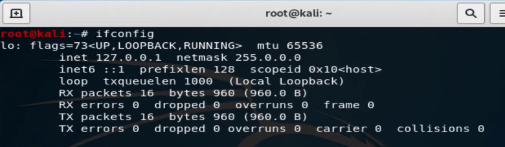
To check setting by command we type ifconfig. If any interface was on, you can have in result
note: Inet 127.0.0.1 netmask 255.0.0.0 is not active interface
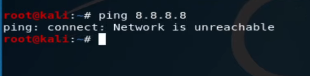
You cannot see any interface and IP; we go next steps. also, we can check it with ping 8.8.8.8
Command DHClient:
The DHCP protocol requests an available IP address from a server or IP provider, which may be assigned in one or more subnets. A DHCP client may request an address from this pool and then use it temporarily on the network. Also, when requesting an IP address, a client can get more details about the connected network, such as the range IP, Gateway, name server, etc.
When running the dhclient command, the dhclient.conf file is called for configuration. It then gets a complete list of network settings configured on the current system and attempts to configure the interface using the DHCP protocol.
The DHCP Client or dhclient command is a tool for configuring a network interface using the Dynamic Host Configuration Protocol
with command #man dhclientyou can get more information about this command in Linux:


 IaaS: The name of these services stands for Infrastructure as a Service and includes bandwidth, processing, or similar services. For example, we can mention Amazon’s web services.
 PaaS: The name of this service stands for Platform as a Service and in this space, users can develop software. In this service, we can use hardware resources for software development. For example, we can mention Force.com service. Of course, other companies also provide other forms of these services.
 SaaS: The name of this service stands for Software as a Service and this form is the most important service provided by the cloud service on the Internet. For example, when you log into your Gmail account and Google Drive, you will see a collection of software based on these services. We can also mention the Basecamp and Netflix services that are based on this.